A personal logbook for people taking warfarin
Your warfarin and INR record, kept in one place.
INR Tracker records the INR results, warfarin doses, vitamin K, activity and health events you enter, with testing reminders and a report for your clinic. Everything you enter, nothing else.

Free to downloadiPhone · iOS 15 or later · No account
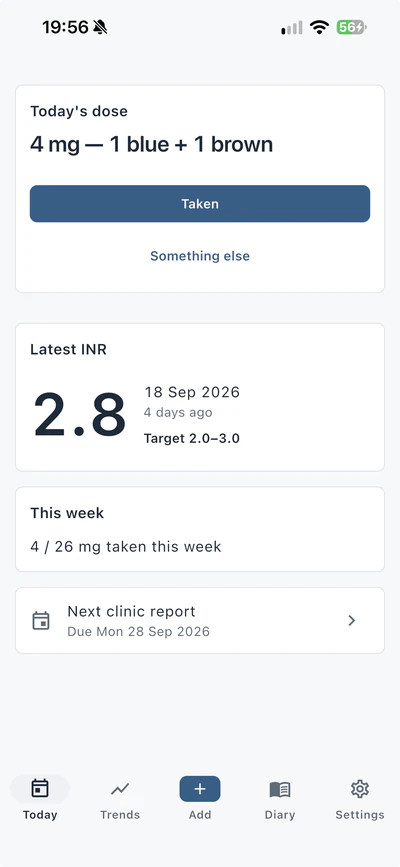
- No accountNothing to sign up for. Open the app and start your record.
- Kept on your iPhoneYour records sit in an encrypted database on your device. We don't receive a copy.
- No advertising, no trackingThe app contains no analytics and no advertising tools.
01Record
Five kinds of entry, each with its date
Record what you want to keep. The diary lists every entry day by day, and filters by type.
- INR results
- Each test result, with the date.
- Warfarin doses
- Your dose schedule as a weekday pattern, and which doses you actually took.
- Vitamin K
- From a food reference list, or as a precise figure you enter yourself.
- Activity
- Type, duration and intensity.
- Health events
- A new or stopped medication, an illness, or a change in weight, as a dated entry.
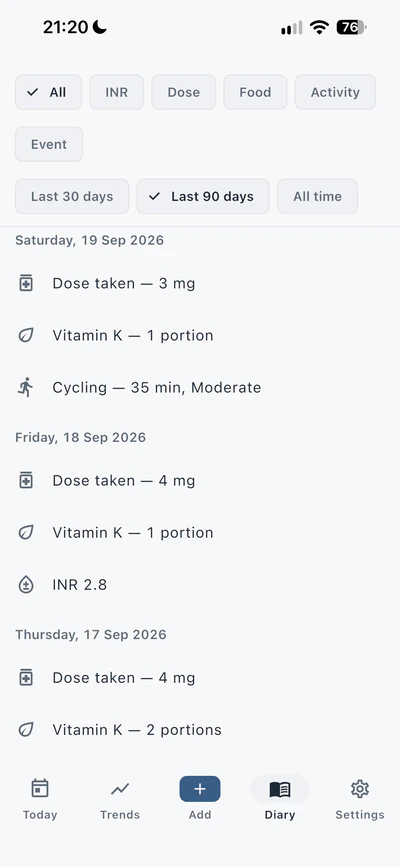
The diary, filtered to the last 90 days.
02Doses
A week of doses, entered as a pattern
Your dose schedule is a pattern for the seven days of the week, in milligrams. The weekly total is worked out from the days you enter, and is never typed in separately.
Each day, record the dose as taken, as a different amount, or as skipped. When your clinic changes your dose, enter the new pattern and the date it takes effect.
The app never proposes, calculates or checks a dose. Your clinic decides your dose.
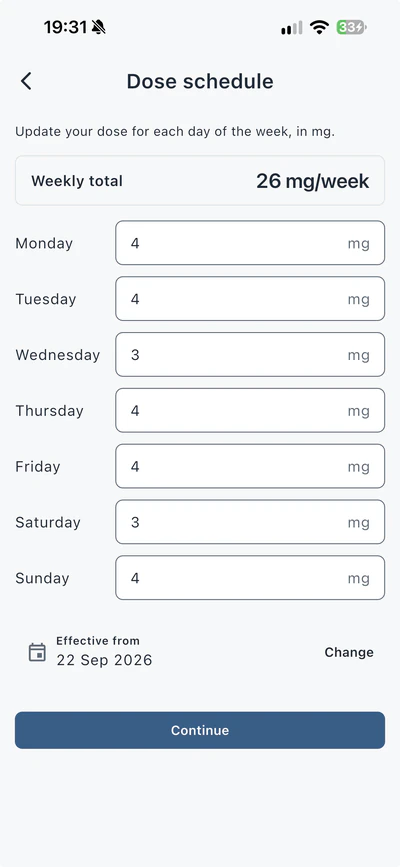
A dose schedule, with its weekly total.
03Reminders
Reminders on the schedule you set
Set your own schedule for dose reminders, test reminders and clinic-report reminders. They are scheduled on your iPhone and don't come from a server.
A dose reminder reads “Today's dose is due.” It doesn't show your dose amount.
Notifications can fail: a flat battery, a system update or a changed permission can all stop them. Don't rely on the app alone to remember a test or a dose.
- INR TrackerWarfarin doseToday's dose is due.
- INR TrackerINR test todayYour usual test day
- INR TrackerClinic report due todayRecord your INR and report it
04Charts
Charts that show what you entered
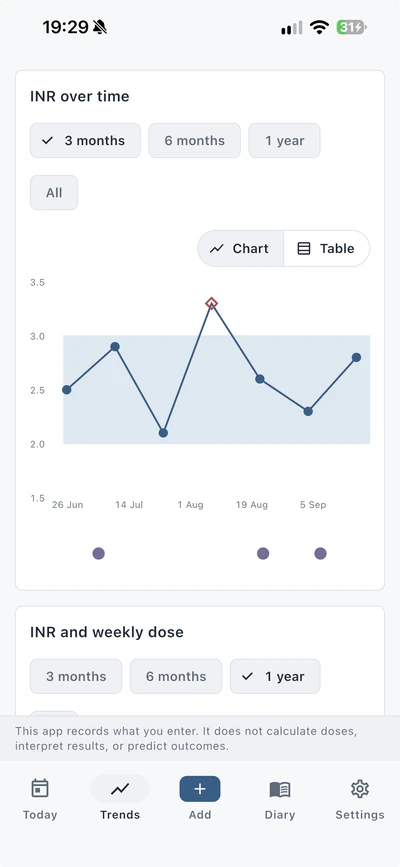
See your recorded readings, doses, vitamin K and activity laid out on shared timelines you can read side by side. Every chart is also a table.
You see exactly what you entered — nothing is scored, labelled or rated.
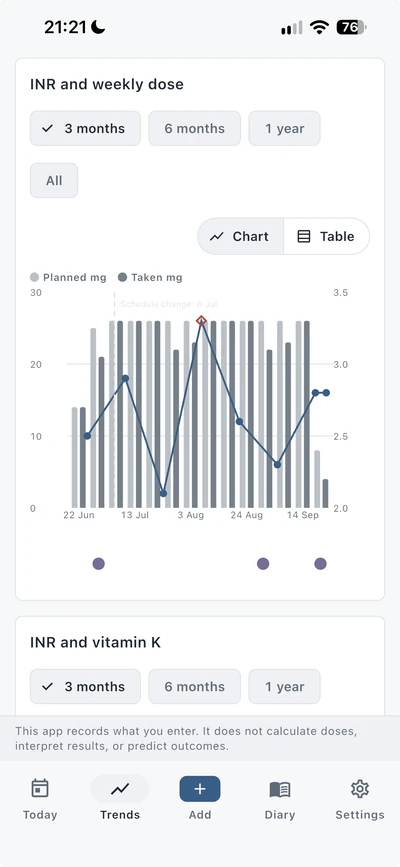
INR over time, with the target range you set, and INR with weekly dose.
05Clinic
Your record, ready for your clinic
Set the dates your clinic expects a report, and the app reminds you as each one comes up. Email a reading to your clinic from your own email app, or generate a printable PDF of your recorded data to bring or send.
Reports show only what you entered. They are not clinical documents.
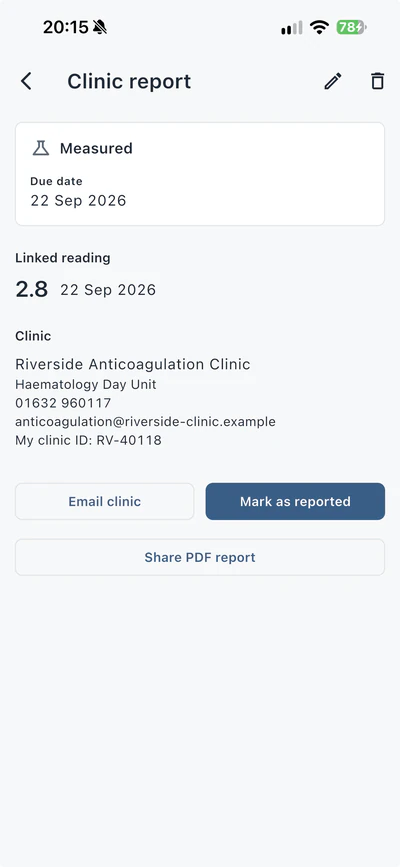
A clinic report, with the reading linked to it. The clinic shown is fictional.
06Your data
Your records stay on your device
Everything you record is kept in an encrypted database on your iPhone. We can't see it, and we don't receive a copy.
- No account. There is no sign-up and no sign-in.
- No analytics, advertising or tracking. The app contains none.
- Backups you control. Save a backup file whenever you like, with a passphrase if you choose one. A backup saved without a passphrase is not encrypted. Automatic backups to your own iCloud Drive are there if you turn them on, with the same choice.
- One check over the internet. Apart from automatic backups you turn on, the only thing the app sends by itself is a check with our payment provider, RevenueCat, to confirm whether you've made the one-time purchase. That check never includes anything you've recorded.
We don't hold a copy of your records, so we can't recover them if they are lost. Making backups is up to you.
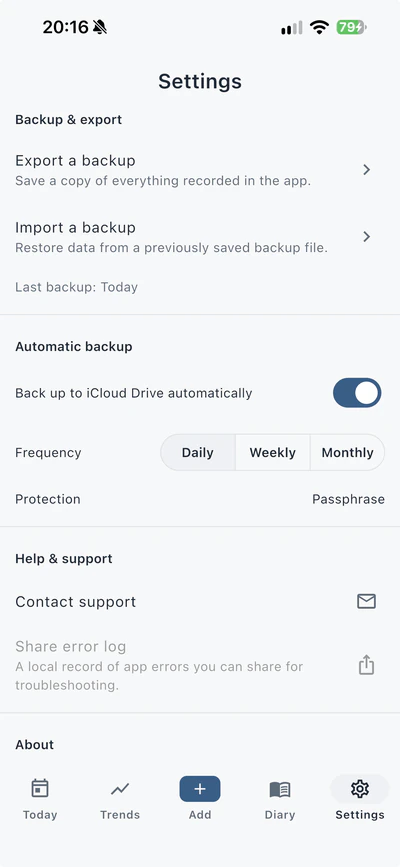
Backup and export, in Settings.
07Limits
What INR Tracker does not do
INR Tracker records what you enter. Decisions about your dose and your care are your clinic's, not the app's. INR Tracker is not a substitute for professional medical care and is not a medical device.
What it does
- Records the entries you make
- Reminds you on the schedule you set
- Shows your entries back to you as lists, charts and reports
- Works out totals and percentages, such as a weekly dose total, from your entries alone
What it does not do
- Calculate a warfarin dose, or tell you what dose to take
- Interpret your results
- Predict future results
- Detect a problem, or check for drug interactions
- Replace your anticoagulation clinic, your doctor or your pharmacist
08Pricing
Free to download. One optional purchase.
Recording, reminders and backup are free. A one-time purchase unlocks the further charts and clinic documents for as long as you use the app. There is no subscription.
Free
£0to download and to record
- Recording INR results, doses, vitamin K, activity and health events
- Dose, test and clinic-report reminders
- The INR timeline chart
- Emailing a reading to your clinic
- Full backup and restore, and CSV and JSON export
One-time purchase
£4.99in the UK, paid once
- Five further charts: weekly dose, vitamin K and activity on shared timelines with your INR, plus consistency and an INR range summary
- The PDF clinic report
More is on its way to the same purchase. See Coming soon.
The price in your country is shown in the App Store before you buy. Apple takes the payment. To ask for a refund, contact Apple.
09Coming soon
More for the same purchase, coming soon
These are built. Each still has to pass our testing and Apple's review. When one is released, it joins the same one-time purchase: if you have already bought it, there is nothing more to pay.
Planned next
For your clinic
- Since your last report. A summary of what you have recorded since your last clinic report — readings, dose changes, doses not taken, vitamin K, activity and health events — with a detailed clinic email.
- Report sections. Choose which sections go into the clinic PDF report.
- Dose calendar. A printable month of planned doses, from the schedule you entered.
- Annual logbook. A printable year of your records, month by month.
Planned later
Quicker to record
- Home-screen widget. Today's dose, and your next test and clinic report dates.
- Lock-screen widgets. The matching widgets for your lock screen, on iOS 16 or later. They never show the dose amount.
- Siri. On iOS 16 or later, ask Siri to log today's dose or an INR reading. The app asks you to confirm before anything is recorded.
- Photos on entries. Attach a photo to an INR reading, a dose schedule or a health event: a meter display or a clinic dose letter, for example. Photos are stored encrypted on your device, with location data removed.
Planned later
More on the timeline
- Weight and alcohol charts. Two charts that put your recorded weight and alcohol units on a timeline with your INR. Recording both is free.
- Import from Apple Health. Bring in workouts and weight from Apple Health. Read only, and only while you use the import screen.
- Scan your meter. Photograph your meter's display to fill in an INR reading, which you check and save yourself. The photo is read on your device and is not kept.
An update is released only after Apple has reviewed it, so we can't give dates. Until then, none of these is in the app.
10Questions
Questions people ask
Is INR Tracker a medical device?
No. INR Tracker is a personal record. It does not calculate a dose, interpret a result, predict an outcome or check for drug interactions, and it is not a substitute for professional medical care.
Do I need an account?
No. There is no account and no sign-up.
Where are my records kept?
In an encrypted database on your iPhone. We can't see them and we don't receive a copy. They leave your device only in a backup or export you make or turn on, a report or email you send, or, still encrypted, in your phone's own device backup. The privacy policy sets this out in full.
What happens if I lose or replace my iPhone?
Your records are on your device and in the backups you make. Save a backup file from the app, or turn on automatic backups to iCloud Drive, then import the backup on the new phone.
Your phone's own device backup may include the app's database, but the key that opens it can't be moved to another device, so make a backup from inside the app. If you lose the passphrase for a backup, that backup can't be opened. We don't hold a copy, so we can't recover your records.
Can I get my records out of the app?
Yes. A backup file holds everything recorded in the app, and your entries also export as CSV or JSON. A backup file is encrypted only if you give it a passphrase; without one, anyone who has the file can read it. CSV and JSON exports are never encrypted, and go wherever you send them.
Is there a subscription?
No. The app is free to download, and the one purchase is paid once.
Which devices does it run on?
iPhone, with iOS 15 or later.
Where is it available?
On the App Store in the United Kingdom, the United States, Canada, Australia and most other countries. It is not available in the countries of the European Union.
Who is it for?
Adults aged 18 or over who take warfarin and keep their own record, or who help someone they care for keep theirs, with that person's permission.
11Support
Help and contact
Email us about the app and we'll reply by email. In the app, Contact support is in Settings, under Help & support.
We can't answer questions about your dose, your results or your care; those are for your clinic. Please include only the health details needed to answer your question.
Start your record
Free to download for iPhone. No account.